
1. Background
Studies have shown that medical errors account for a mortality rate of 44,000 - 98,000 in hospitals and also that medical errors cost up to $29 billion for a state economy (1, 2). Nowadays, pharmacy information systems (PISs) are widely used in healthcare settings to perform different tasks such as: patient order entry; management and dispensing; inventory and purchasing management; pricing; charging and billing; and medication administration and reporting (utilization, workload, and financial) (3). PISs are used not only to optimize the safety and efficiency of the medication use process (4), but also to connect the pharmacy department of the hospital to other hospital departments (5). Therefore, these systems can improve cost control, patient care quality, information security, information administration, and finally can lead to a decrease in medication errors (6-8).
Despite the advantages of these systems, various studies have shown that some of them could not meet the needs of their users (9-11). In addition, they may cause new kinds of problems that will probably increase error potential (12-14), which will lead consequently to patient harm or increased cost (15).
One of the factors causing inefficient systems is usability problems (16). The best-known definition of usability is by Nielsen: usability is about learnability; efficiency; memorability; errors; and satisfaction (10). Poor usability can decrease efficiency and effectiveness of the systems and of the satisfaction of users (10, 17). Systems with usability flaws have the potential to increase medication errors and can even lead to disaster (1, 2). Therefore, the effective usability evaluation of these systems is necessary (18).
There are a variety of usability evaluation methods (19). Heuristic evaluation is one of the most common methods for finding usability problems (20, 21). Applying this method, evaluators measure the usability, efficiency, and effectiveness of the interface on the basis of 10 usability heuristics (22). The low cost and low number of evaluators (three to 10) are counted as the benefits of the method. Without user involvement, usability evaluation method evaluates the system on the basis of principles that support good usability and identify a relatively high number of usability problems within a reasonable time (21, 23).
PIS has not yet been evaluated in Iran although it plays an important role in hospitals. Its usability has a potential impact on medication process. As a result, the present study evaluates PIS on the basis of heuristic evaluation, and reports a list of usability problems which can help designers to take the users’ needs into account for performing things faster and better in the design and development of PISs.
2. Methods
This study was conducted on the PIS, which is applied in the hospital information system (HIS) of more than 200 hospitals in Iran. This system started being implemented in hospitals from 1997. Routinely, about 2,000 daily active users interact with this system. Through the PIS, users send prescription medications. Technicians receive orders via these PISs and prepare them. An illustration of the PIS user interface is shown in Figure 1.
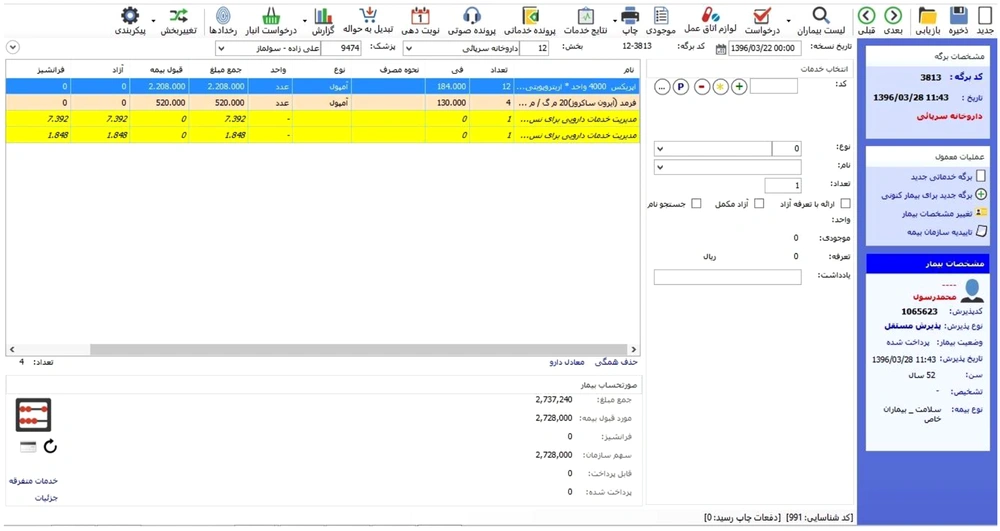
Figure 1.
An illustration of the PIS user interface
We used a heuristic evaluation method, which is one of the most commonly-used usability evaluation methods, to evaluate the PIS. It is a discount usability inspection method for computer software which helps to identify usability problems in the user interface (UI) design based on Nielsen’s 10 usability heuristics (21) (Table 1).
Table 1.
Nielsen’s Usability Heuristics
| Usability Heuristic | Description |
|---|---|
| 1- Visibility of system status | The system should always keep users informed about what is going on through appropriate feedback given within reasonable time. |
| 2- Match between system and the real world | The system should speak the user’s language, with words, phrases, and concepts familiar to the user, rather than system-orientated terms. Follow real-world conventions, making information appear in a natural and logical order. |
| 3- User control and freedom | Users often choose system functions by mistake and will need a clearly marked “emergency exit” to leave the unwanted state without having to go through an extended dialog. Support undo and redo. |
| 4- Consistency and standards | Users do not have to wonder whether different words, situations, or actions mean the same thing. Follow platform conventions. |
| 5- Error prevention | Even better than good error messages is a careful design which prevents a problem from occurring in the first place. Either eliminate error-prone conditions or check for them and present users with a confirmation option before they commit to the action. |
| 6- Recognition rather than recall | Minimize the user’s memory load by making objects, actions, and options visible. The user should not have to remember information from one part of the dialog to another. Instructions for use of the system should be visible or easily retrievable whenever appropriate. |
| 7- Flexibility and efficiency of use | Accelerators - unseen by the novice user - may often speed up the interaction for the expert user such that the system can cater to both inexperienced and experienced users. Allow users to tailor frequent actions. |
| 8- Aesthetic and minimalist design | Dialogs should not contain information which is irrelevant or which is rarely needed. Every extra unit of information in a dialog competes with the relevant units of information and diminishes their relative visibility. |
| 9- Help users recognize, diagnose, and recover from errors | Error messages should be expressed in plain language (no codes), precisely indicate the problem, and constructively suggest a solution. |
| 10- Help and documentation | Even though it is better if the system can be used without documentation, it may be necessary to provide help and documentation. Any such information should be easy to search, be focused on the user’s task, list concrete steps to be carried out, and not be too large. |
The evaluation team was made up of 10 usability evaluators including a PhD in medical informatics, a PhD in health information management, a senior MSc in health information technology and seven senior MSc students in medical informatics. They all took theoretical and practical courses on usability engineering. Before evaluating the system, evaluators familiarized with the UI system. Then, individually, they investigated the UI system on the basis of heuristics and made a list of the usability problems. Having completed all evaluations, the evaluators reconsidered and aggregated their findings. The results of the evaluation indicated a set of system design violations (19). Finally, the list of usability problems was sent to all evaluators who quantified the severity of identified problems based on the following factors:
- Frequency: Is it common or rare?
- Impact: Will it be easy or difficult for the users to overcome?
- Persistence: Is it a one-time problem that users can overcome once they know about it or will the users repeatedly be annoyed by the problem? (24) (Table 2).
Table 2.
Nielsen’s Severity Rating Scalea
| Problem | Severity | Description |
|---|---|---|
| No problem | 0 | I don’t agree that this is a usability problem at all |
| Cosmetic | 1 | Need not be fixed unless extra time is available on project |
| Minor | 2 | Fixing this should be given low priority |
| Major | 3 | Important to fix, so should be given high priority |
| Catastrophe | 4 | Imperative to fix this before product can be released |
aThe average severity of each problem was calculated and rounded to the nearest whole number.
This study was reviewed and approved by the Urmia University of Medical Sciences research ethics committee, Urmia, Iran.
3. Results
Ten evaluators conducted the heuristic evaluation of the PIS. They identified 167 usability problems based on Nielsen’s 10 heuristics. The number of problems duplicated and, after we removed the duplicate problems, 125 unique problems remained. We analyzed the unique usability problems based on their severity and on violated heuristics.
The results indicate that, in terms of usability violations, two heuristics including “consistency and standards,” with 23 (18.40%), and “recognition rather than recall”, with 17 (13.60%), were the most frequently violated ones, whereas the heuristics including “error prevention,” with 9 (7.20%), and “help users recognize, diagnose, and recover from errors,” with 9 (7.20%), were identified as the least frequently violated heuristics (Table 3).
Table 3.
Identified Usability Problems per Violated Heuristics and Severity
| Violated Heuristic | Severity | A Total of Violations | Average Severity | ||||
|---|---|---|---|---|---|---|---|
| Cosmetic | Minor | Major | Catastrophe | Frequency | Percent | ||
| 1- Visibility of system status | 0 | 5 | 7 | 2 | 14 | 11.20 | 3 |
| 2- Match between system and the real world | 0 | 8 | 6 | 2 | 16 | 12.80 | 3 |
| 3- User control and freedom | 0 | 4 | 6 | 1 | 11 | 8.80 | 2 |
| 4- Consistency and standards | 2 | 7 | 8 | 6 | 23 | 18.40 | 4 |
| 5- Error prevention | 0 | 3 | 4 | 2 | 9 | 7.20 | 3 |
| 6- Recognition rather than recall | 1 | 4 | 7 | 5 | 17 | 13.60 | 3 |
| 7- Flexibility and efficiency of use | 0 | 7 | 5 | 3 | 15 | 12.00 | 3 |
| 8- Aesthetic and minimalist design | 2 | 3 | 6 | 0 | 11 | 8.80 | 2 |
| 9- Help users recognize, diagnose, and recover from errors | 0 | 3 | 5 | 1 | 9 | 7.20 | 3 |
| 10- Help and documentation | 0 | 0 | 0 | 0 | 0 | 0.00 | 4 |
| Total | 125 | 100 | |||||
| Frequency | 5 | 44 | 54 | 22 | |||
| Percent | 4.00 | 35.20 | 43.20 | 17.60 | |||
Among these 10 heuristics, the average severity of usability problems concerning seven heuristics, including “visibility of system status,” “match between system and the real world,” “consistency and standards,” “error prevention,” “recognition rather than recall”, “flexibility and efficiency of use,” “help users recognize, diagnose, and recover from errors,” and “help and documentation,” were major and catastrophic, while the average severity of problems related to other heuristics such as “User control and freedom” and “aesthetic and minimalist design” were minor.
As a result, major violations with 54 identified usability problems were more common than minor violations, with 44 (35.20%), and catastrophic violations, with 22 (17.60%) identified usability problems. The least common violations were cosmetic violations, with 5 (4.00) usability violations. Finally, more than half of the problems (n = 76) were related to major and catastrophic violations (Figure 2).
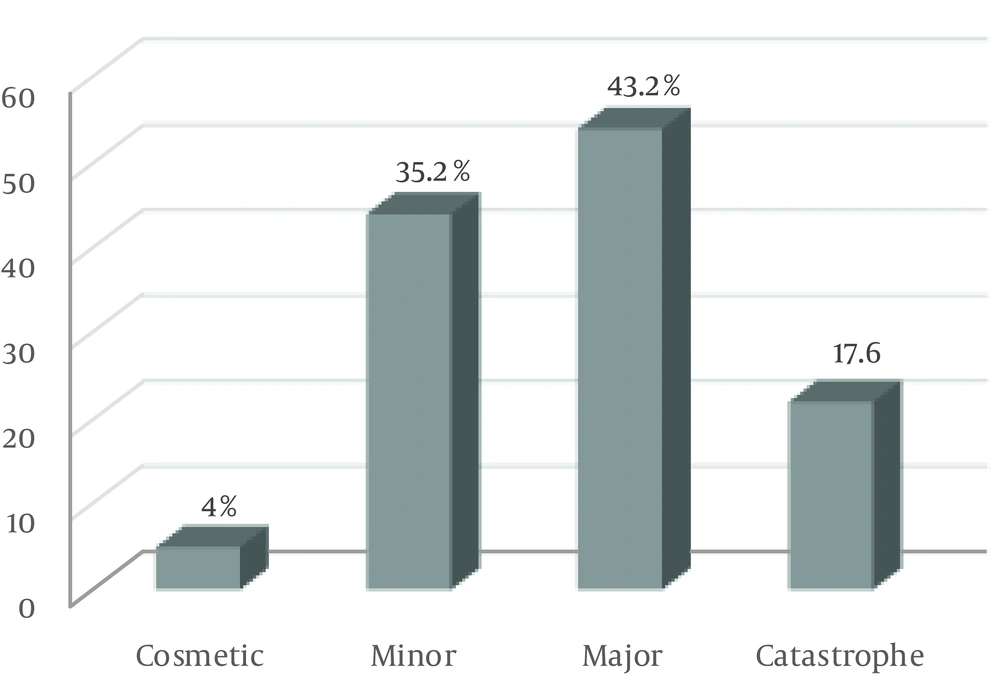
Figure 2.
Frequency of heuristic violations
In addition, examples of the usability problems are categorized according to the 10 heuristics below:
3.1. Visibility of System Status
The user was not kept informed of the system’s progress when there were observable delays (greater than 15 second) in the system’s response time. Selected icon was invisible when surrounded by unselected icons. There was not a consistent icon design scheme and stylistic treatment across the system.
3.2. Match Between System and the Real World
When prompts implied a necessary action, the words in the message were not consistent with that action. Some terms, concepts, and icons used in the system were unclear and ambiguous. The system did not use the users’ background knowledge.
3.3. User Control and Freedom
There were not “undo” and “redo” functions. The users could not easily switch between overlapping windows. The “minimize,” “maximize”, and “close” buttons were not available.
3.4. Consistency and Standards
There were more than 20 icon types in the system. There was not an appropriate color spectrum in the system. Attention-getting techniques, such as intensity, size, font, and color were not used with care.
3.5. Error Prevention
The system did not prevent users from making errors. The system did not caution users if they were about to make a potentially serious error. Fields in data entry screens did not contain the appropriate default values.
3.6. Recognition Rather Than Recall
The optional data entry fields did not clearly mark. Text areas did not have “breathing space” around them in some windows. There were not salient visual cues to identify the active window.
3.7. Flexibility and Efficiency of Use
The system did not provide function keys for high-frequency commands. The system did not have the ability to support both novice and expert users.
3.8. Aesthetic and Minimalist Design
Some buttons are not organized neatly and orderly on screen. Text font was small. The system did not use a good color palette with a minimalist design.
3.9. Help Users Recognize, Diagnose, and Recover from Errors
The error messages did not inform the users of the error’s severity. The error messages did not suggest the cause of the problems. The error messages did not indicate what action the users needed to take to correct the error.
3.10. Help and Documentation
Did not provide in PIS.
Figure 3 below shows some examples of usability problems.
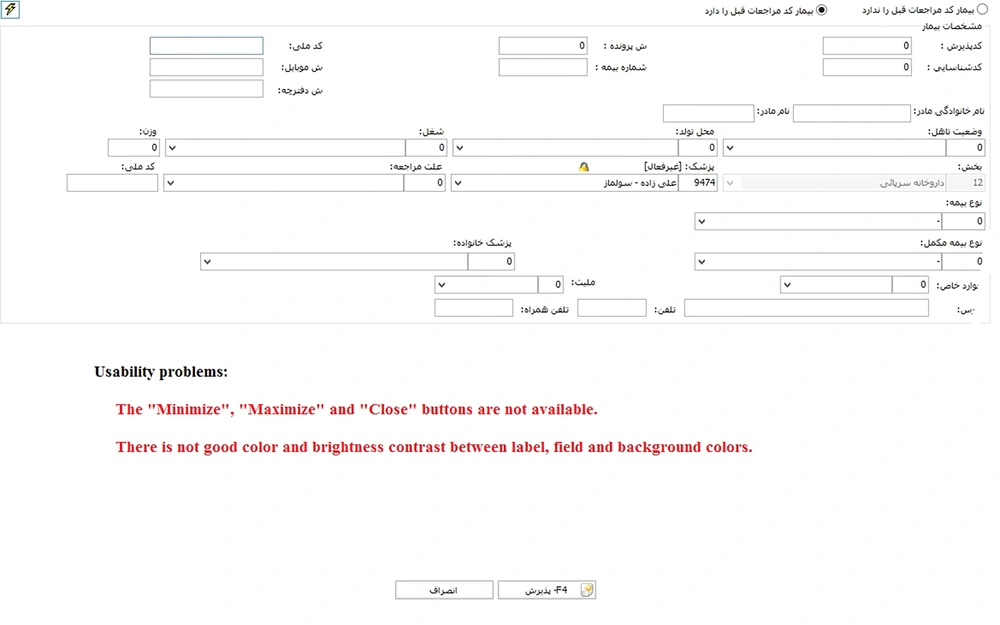
Figure 3.
Examples of usability problems
4. Discussion
The present study evaluated PIS, which are widely used in Iranian hospitals, to identify the usability problems of PIS. The evaluator identified a high number of usability problems in RIS through the heuristic evaluation. More than half of these problems were major and catastrophic. In general, the heuristic “help and documentation” is not defined in PIS, and lack of this heuristic can confuse users. Our results indicated that the heuristics “consistency and standard” and “recognition rather than recall” have the largest number of violations, with the lowest number of violations related to “error prevention” and “Help users recognize, diagnose, and recover from errors” heuristics. These results are similar to the results of other studies, such as the those conducted by Khajouei et al., Atashi et al., and Nabovati et al. in Iran (25-27), and also the studies conducted by Choi and Bakken, Georgsson et al., Joshi et al., and Mirkovic et al. in countries other than Iran, which reported a high number of violations concerning these heuristics (28-31). On the other hand, the unexpected results of this study indicated that the severity of 60.8% of all violations is major and catastrophic, which accounts for more than half of the identified violations and, in this case, the result of our study is consistent with results of the studies by Ellsworth et al. and Okhovati et al. (32, 33). In spite of recent advances in healthcare information systems, designers may not employ all UI design standards.
These problems have the potential to put patients at risk. In addition, they can negatively affect effectiveness and efficiency of the systems, satisfaction of their users, and hospital’s financial issues. Inconsistent designs, the inflexibility of high-frequency commands, the impossibility to undo or redo actions, duplicate page titles, long registration forms, poor distinction between mandatory and optional data entry fields, and many others are cited as other sorts of usability problems as well. Designers, developers, and customers can use the results of such evaluation studies. Consequently, designers and developers have to consider these types of usability aspects in design and development phases in order to produce effective information systems. With the advantage of being aware of these problems, customers can select the system with a lower number of usability problems.
From the methodological point of view, we found that survey or distributed questionnaires among end-users are the most common method employed in usability evaluations of health-related information systems (33). Beyond the usefulness of surveys for gathering data in these kinds of studies, they do not allow evaluators to identify individual usability problems, so, in considering this limitation, we applied heuristic evaluation in our study by recruiting 10 external evaluators to detect individual usability problems that could be targeted for improvement of the implemented system. However, our study has some limitations. The first limitation encountered by the present study is that this method is used by usability evaluators without the involvement of real users. As a result, on the one hand, some of the problems may not annoy users in real working environments, and on the other hand, real users will probably identify some problems which have not been recognized by evaluators.
The other limitation was that it was better to use a pharmacist to comment on the expert opinion. Yet in this phase of study, we did not ask opinions of internal users regarding the system usability.
4.1. Conclusions
Nowadays, the healthcare industry is widely using information systems. One of the important features of these systems is their good usability. The weak usability of some systems can also cause some user-system interaction problems, which will lead to inefficiency of systems and dissatisfaction of users. Therefore, it is important that the UIs of these systems, which are used by a wide range of users, be evaluated in applying various usability evaluation methods. Based on the results of this study, the most important problem is that system designers neglect the existing standards and principles of system design. One of the usability problems is that the systems do not have any help, given that users do not have proper training to use the system, which puts the system at the disadvantage of real usability. It is recommended that the designers design systems on the basis of existing standards and principles. Every year the systems need to be evaluated and, based on the results, the systems must be updated.