Finding the right reviewer is the hardest part of running peer review. This page covers the three tasks involved: searching the reviewer pool, sending an invitation, and keeping reviewer subject classifications accurate so that future searches work.
Inviting an associate editor or reviewer
> Tutorial Video:
- To watch a video about "Invite AE", refer: [YOUTUBE] | [APARAT]
- To watch an educational video about "Invite Reviewer" refer: [YOUTUBE] [APARAT]
To invite an Associate Editor or a Reviewer to do a review of a manuscript:
- Sign in to the Brieflands journals with the "EIC" role (for inviting AE) and "AE" role (for inviting a reviewer).
- In "Manage Manuscripts," go to "Invite AE" or "Invite Reviewer."
- There are 3 options: "Invite AE/Reviewer", "Fast EIC/AE Decision", and "Withdraw."
- To invite AE/Reviewer, click on the button and choose the favorite AE/Reviewer based on his/her name or classification. Using "classification", EIC or AE can list all potential AE or reviewers for that classification.
Notes:
- The start Date must be earlier than the due date.
- To invite the previous AE for the earlier revision, find the AE by clicking the desired revision.
Send an email of Invitations to a Reviewer: EIC can add CC or BCC (or more details) for the reviewers and finally send an email to them.


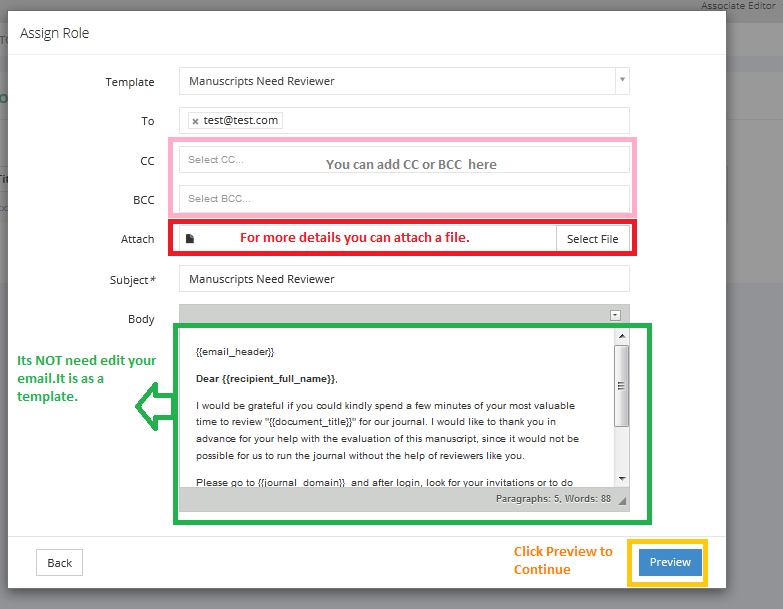
Invitation Emil is editable

Invite a Reviewer using "Manage Users."
- EIC must click on Manage User (left menu) and Invite a New Person (by writing the email and the full name of the desired reviewer).
- For those previously registered users, an Assign Role action is required.
Finding reviewers in Brieflands journals
We have made a new facility to search and invite a reviewer or associate editor in Brieflands journals.
To search and invite a reviewer in all of Brieflands journals:
- Go to "Invite Reviewer" > Select "Search in All Journals."
- Select the desired classification or search for a name among reviewers.
- Then you will be able to invite them.

After a while, you will see a list of reviewers and invite them.
The new modal shows the number of invited tasks and un-invited tasks.

Besides, you can limit the results to the reviewers who have ORCID or are members of Publons.

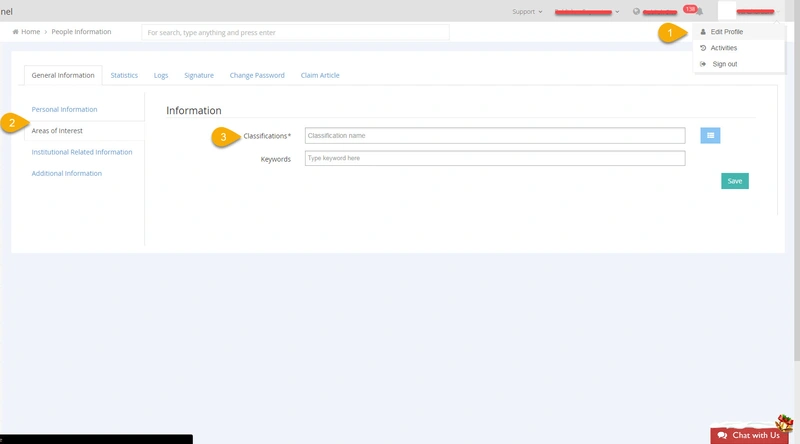
Editing reviewer classifications
Reviewer Classification Management
At Brieflands Publisher, associate editors have the authority to modify the classification of reviewers. This ensures that reviewers are accurately categorized based on their expertise and qualifications, facilitating a more effective and precise peer review process. By adjusting reviewer classifications, associate editors help maintain the integrity of the editorial workflow and ensure that submissions are matched with the most suitable reviewers.